Bulma Based UI Components for Vue.js
Bulma Based UI Components for Vue.js
Hi. In this post I’ll talk about Buefy. If you are using Vue.js on your projects you’ll love Buefy. Because it is based on the Bulma Framework. Bulma is an open source CSS framework based on Flexbox. I can say Tesla using Bulma on their some projects. If you’re bored with Bootstrap, it might be a good choice for you. There are many modern UI components in Buefy.

Bulma Based UI Components for Vue.js
Before you start, you need to install Vue.js as you know. After that you can install Buefy with below command.
npm install buefyThat’s all. We’ve install Buefy now. Now we’ll do some configuration on our main.js file to use Buefy. Firstly we’ll import Buefy as component and its css file
import Buefy from 'buefy'
import 'buefy/lib/buefy.css'
We’ll pass Buefy component to vue’s use method. For example our main.js file should be like this:
import Vue from 'vue'
import App from './App'
import router from './router'
import Buefy from "buefy"
import 'buefy/lib/buefy.css'

Vue.use(Buefy)

Vue.config.productionTip = false

new Vue({
    el: '#app',
    router,
    components: { App },
    template: ''
})

Ok we've done everything to use Buefy. Let's start with a simple example. I'll create basic navbar component with Buefy.

Home

Books

Book Reviews

Users

Books

Favorites

Login

Signup!

And its script should be like this:

import LoginModal from "../modals/LoginModal"

export default {
    name: 'Navbar',
    props: ['hideNavLogins'],
    data() {
        return {
            showNav: false,
            logo: './static/logo.png',
            navLogin: true
        }
    },
    components: {
        LoginModal
    },
    mounted() {

        this.navLogin = this.hideNavLogins
        if(this.hideNavLogins == undefined) {
            this.navLogin = true;
        }
    },
    methods: {
        showSubMenu() {

            let m;
            let e;
            try {
                e = event.target;
                m = event.target.nextSibling.nextSibling.classList;

            } catch (error) {
                e = event.target.parentNode;
                m = event.target.parentNode.nextSibling.nextSibling.classList;

            }

            let class1 = e.childNodes[1].classList.contains('mdi-arrow-down') ? 'mdi-arrow-down' : 'mdi-arrow-up';
            let class2 = class1 == 'mdi-arrow-down' ? 'mdi-arrow-up' : 'mdi-arrow-down';

            e.childNodes[1].classList.replace(class1, class2)

            m.toggle('is-hidden-touch')
        },
        openLogin() {
            this.$modal.open({
                parent: this,
                component: LoginModal,
                hasModalCArd: true,
                props: {
                }
            })
        },
        myMethod() {
            console.log("...")
        }
    }
}

It will look like this when you run your project:
Now we'll change default component's template and it's script section. For example we have a component named Home.vue. It's template should be like this:

Latest Books

Search

{{ book.volumeInfo.title }}
{{ book.volumeInfo.subtitle }}

{{ (book.volumeInfo.description) ? book.volumeInfo.description.substring(0,100) + '...' : '' }}

{{ book.volumeInfo.publishedDate }}

And its script should be like this:

import Navbar from "./features/Navbar"

export default {
    name: 'Dashboard',
    data() {
        return {
            search: '',
            desc: '',
            books: []
        }
    },
    components: {
        Navbar
    },
    mounted() {
        this.fetchBooks();
    },
    methods: {
        fetchBooks() {
        },
        async searchBooks() {
            let link = `${this.$api.links['google-search']}${encodeURIComponent(this.search)}&key=AIzaSyAcotR8YZ-Zsd6dcREUBhkUA_NE3UC5AIY`

            const data = await fetch(link).then(resp => resp.json())

            this.books = data.items

        },
    },
}

In this example we are using google books api. Now, our home page should be like this: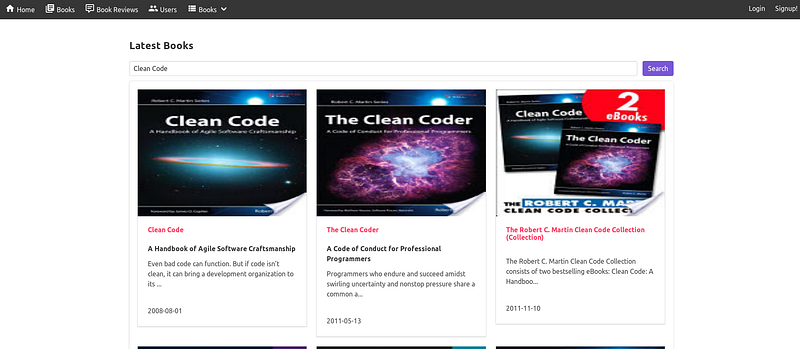
Let's Create Login Modal

We'll create login modal. Buefy has the JavaScript API to use modal. In this example we'll create a modal component named LoginModal.

Member Login

I forgot my password

Login

Signup!

And its script will be like this:

import LoginLogo from "../features/LoginLogo"
import PasswordForgot from "./PasswordForgot"

export default {
    name: 'LoginModal',
    data () {
        return {
            mail: '',
            password: '',
        }
    },
    components: {
        LoginLogo,
        PasswordForgot
    },
    methods: {
        passwordReminder() {
            this.$parent.close()
            this.$modal.open({
                parent: this,
                component: PasswordForgot,
                hasModalCArd: true,
                props: {
                }
            })
        },
        closeModal() {
            this.$parent.close()
        },
        doLogin() {
            this.$parent.close()
            this.$router.push('/dashboard')
        }
    }
}

Our modal will be like this: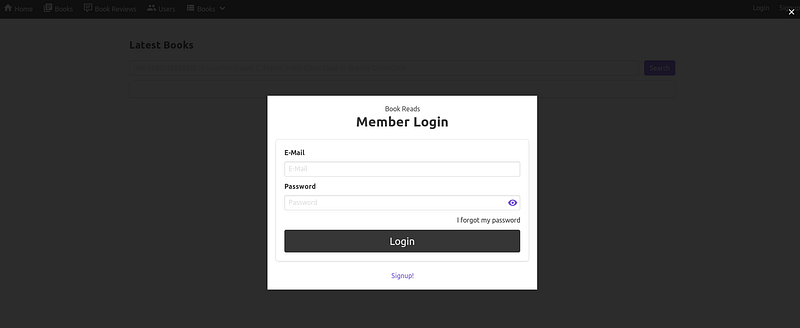
Nice. We've created basic bookreads portal alternative to goodreads. But Buefy's has more component. For example its table component alternative to jQuery DataTable.

I published the bookreads project on GitLab. You can use directly or you can fork it to contribute it.

https://gitlab.com/aligoren/bookreads

In this post we talked about Buefy and Vue. You can create great projects with Buefy and Vue. If you have any questions please ask

Thanks for reading.